
Repair Corrupted Photos with Free Online Photo Repair Tool

Easily repair any corrupted or damaged photos, including JFIF, JPE, JIF, JPG, JPEG, PNG, GIF, CR2, CR3, CRW, NEF, NRW, TIF, TIFF, DNG, ARW, RAF, GPR, ORF, SR2, X3F, HEIC, BMP, RW2, AVIF, WEBP, AVG, SRW, ERF, PEF, SRF, MRW, 3FR and JXL formats from cameras, phones, or memory cards. EaseUS Online Photo Repair Tool can fix images that became corrupted,pixelated, greyed out, distorted, or unopenable after transfer, editing, or storage issues. With smart AI photo repair technology, this online image repair tool identifies and fixes common corrupted image problems such as missing pixels, blur, or color errors. You can quickly preview the restored photo online and download it instantly without installing any software.
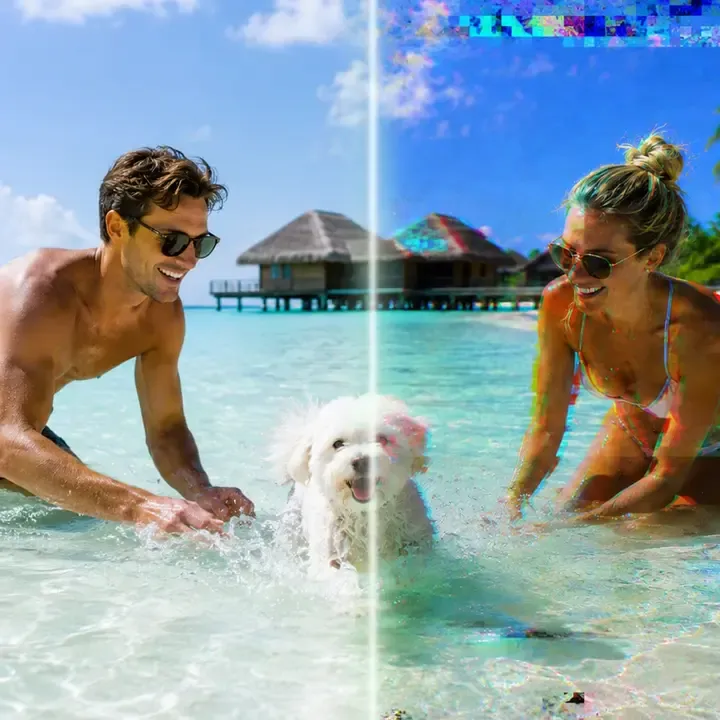
Corrupted photo repair preview showing damaged image restored online
Start Repairing Now
Secure
Drop your photo here to start repair
or choose a photo from your device
Select Photo to Repair
View the full repair workspace
Supports JPG, JPEG, PNG, RAW and more, Your file stays private
Secure online photo repair icon
100%Safe & secure
20 years photo repair experience icon
20 Years+Repair experience
120 million repaired photo files icon
120 Million+Repaired files
Average repair time icon
~30sAverage repair time

3 Steps to Repair Your Corrupted Photos Online

See how the photo moves from upload and image diagnosis to a restored preview.

Upload the damaged photo
Choose the original camera or phone file whenever possible.
Check and repair image data
Review the format, damage status, and the repair plan before processing.
Preview and download
Check the restored photo, then save a separate repaired copy.

Advanced Online Photo Repair Fixes Any Damage

Want to relive your favorite memories? Look no further than the EaseUS online photo repair tool. It handles any kind of damage, such as unopened images, photo scratches, fading color, pixelated photos, fuzzy pictures, or other blemishes, with no hassle!

Corrupt Images after
Corrupt Images before
The image file is damaged and cannot be opened or viewed properly. It may show error messages or display visual artifacts and distortions.
Corrupt Images
Photos Not Opening after
Photos Not Opening before
The JPEG, JPG, or PNG image file fails to open in any viewer or editor due to format incompatibility, file header damage, or corruption.
Photos Not Opening
Images Greyed Out after
Images Greyed Out before
Photos appear dull or desaturated, often indicating that they are inaccessible for editing or viewing until an issue is resolved due to permission errors or being used by another program.
Images Greyed Out
Blurry Pictures after
Blurry Pictures before
The broken photos lack sharpness and clarity, making it hard to see details. This iisue is often caused by camera shake, incorrect focus, or low resolution.
Blurry Pictures
Overexposed or Underexposed Photos after
Overexposed or Underexposed Photos before
Overexposed photos are too bright, with the highlights diluted, while underexposed pictures are too dark, losing details in the shadows.
Overexposed or Underexposed Photos
Pixelated Images after
Pixelated Images before
When low-resolution images are magnified beyond their quality limits, the resulting images may appear blocky or composed of large, visible pixels.
Pixelated Images
Image Stitching Error after
Image Stitching Error before
In panoramic photos, it is common for some parts of the image to be misaligned, resulting in visible seams or mismatched areas in the final stitched image.
Image Stitching Error
Wrong Color Photos after
Wrong Color Photos before
Incorrect white balance, sensor issues, or file corruption can cause the colors in the image to appear unnatural or distorted.
Wrong Color Photos
Photo Metadata Lost after
Photo Metadata Lost before
Essential data, such as date, time, location, or camera settings, is lost from the image file, which makes it more difficult to organize and identify photos.
Photo Metadata Lost

Save Precious Memories with EaseUS AI Photo Repair Online

Nothing beats the nostalgia of cherishing old memories. With EaseUS AI Photo Repair, you can effortlessly recover any corrupted photo.

Repair Blurry, Unopenable, and Grey Photos of Various Formats

Repair Blurry, Unopenable, and Grey Photos of Various Formats

EaseUS online photo repair tool will restore clarity and reveal the true beauty of corrupted photos by rediscovering the hidden details and vibrant colors of your pixelated, grayed-out images. It supports to repair a wide variety of photo formats, including JPEG, JPG, PNG, CR2, NEF, CR3, NRW, RAF, DNG, ARW, GPR, TIF, TIFF, CRW, GIF, SR2, ORF, and more.
Repair Photo Free
Try Pro Repair
Fix Photos from Different Devices Without Compromising Their Original Quality

Fix Photos from Different Devices Without Compromising Their Original Quality

EaseUS free AI photo repair tool can intelligently and smartly repair damaged photos from any device, including local disks, USB flash drives, memory sticks, SD cards, digital cameras, drones, CCTV, and phones while preserving their exceptional quality.
Repair Photo Free
Try Pro Repair

Upgrade to Get More Advanced Photo Repair Options

Looking for repair options beyond free Online Photo Repair? Download Local Photo Repair for advanced features and enhanced capabilities.

Capability
Online repairFor a quick small-size file
Desktop repairFor larger or multiple files
Best for
Quick repair in a browser
Large files, advanced repairs, or privacy-sensitive jobs
Formats supported
JFIF, JPE, JIF, JPG, JPEG, PNG, GIF, CR2, CR3, CRW, NEF, NRW, TIF, TIFF, DNG, ARW, RAF, GPR, ORF, SR2, X3F, HEIC, BMP, RW2, AVIF, WEBP, AVG, SRW, ERF, PEF, SRF, MRW, 3FR, JXL, etc
Advanced repair
Not available
Available
File size
< 100 MB
Unlimited
Automatic repair
Not available
Available
Local & private processing
Processed over an encrypted connection
Privacy & local processing
Offline use
Requires internet
Fully offline
Complex damage
Common structural damage
Advanced workflows for severe corruption
Premium technical assistance
Not supported
Supported
Access
Open the browser and go
Download and install
Repair File Online
No installation required
Try Fixo DesktopDesktop app download required

Frequently Asked Questions

What Our Users Say?

Browse more repair experiences from different files, devices, and real-world situations.

I checked the content of the repaired files, and the results were excellent! Thank you very much for the outstanding performance of EaseUS Fixo!
Akihito Tada
Akihito Tada
Video creator
This software is amazing! I successfully repaired the video files, and the audio is intact as well. I am very satisfied with the results of EaseUS Fixo and highly recommend it to anyone in need of video repair!
Dolf Wijnans
Dolf Wijnans
Camera user
I tried other software to repair video files and without success. After I discovered EaseUS Fixo on the website, I repaired the file without any problems. A huge advantage over other software is the preview of a few seconds of the repaired video. Other programs did not offer this option. Now I know why. Because it cannot repair video files.
DV STUDIO
DV STUDIO
Freelancer
The Data Recovery Wizard worked reliably, and we were able to recover lost data, and then used Fixo, to uncorrupt what we had lost. Highly recommend.
Kevin
Kevin
IT Specialist
I checked the content of the repaired files, and the results were excellent! Thank you very much for the outstanding performance of EaseUS Fixo!
Akihito Tada
Akihito Tada
Video creator
This software is amazing! I successfully repaired the video files, and the audio is intact as well. I am very satisfied with the results of EaseUS Fixo and highly recommend it to anyone in need of video repair!
Dolf Wijnans
Dolf Wijnans
Camera user
I tried other software to repair video files and without success. After I discovered EaseUS Fixo on the website, I repaired the file without any problems. A huge advantage over other software is the preview of a few seconds of the repaired video. Other programs did not offer this option. Now I know why. Because it cannot repair video files.
DV STUDIO
DV STUDIO
Freelancer
The Data Recovery Wizard worked reliably, and we were able to recover lost data, and then used Fixo, to uncorrupt what we had lost. Highly recommend.
Kevin
Kevin
IT Specialist

Repair Your Corrupted Photo Now

Upload the original photo, check the damage, and preview the repaired result.
Free to tryFree to try
Preview before downloadPreview before download
Original files untouchedOriginal files untouched
Choose a Photo to Repair
No installation — runs in your browser